Introduction
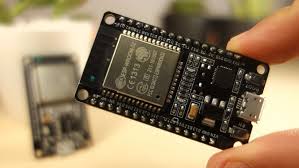
The ESP32 is a powerful microcontroller with built-in WiFi and Bluetooth capabilities, making it perfect for IoT projects. In this comprehensive guide, I'll show you how to set up WiFi connectivity on your ESP32 and explore various configuration options for robust wireless communication.
Whether you're building a simple sensor node or a complex IoT system, understanding ESP32 WiFi connectivity is essential for creating reliable wireless applications.
Prerequisites
- ESP32 Development Board – Any ESP32 variant with WiFi
- Arduino IDE – With ESP32 board package installed
- USB Cable – For programming and power
- WiFi Network – 2.4GHz network credentials
- WiFi Library – Built-in ESP32 WiFi library
- Serial Monitor – For debugging output
Basic WiFi Connection
Let's start with a simple WiFi connection example that demonstrates the fundamental concepts:
#include <WiFi.h>

const char* ssid = "YOUR_WIFI_NAME";
const char* password = "YOUR_WIFI_PASSWORD";

void setup() {
    Serial.begin(115200);
    delay(1000);

    // Start WiFi connection
    Serial.println("Connecting to WiFi...");
    WiFi.begin(ssid, password);

    // Wait for connection
    while (WiFi.status() != WL_CONNECTED) {
        delay(1000);
        Serial.print(".");
    }

    Serial.println("");
    Serial.println("WiFi connected successfully!");
    Serial.print("IP address: ");
    Serial.println(WiFi.localIP());
    Serial.print("Signal strength (RSSI): ");
    Serial.println(WiFi.RSSI());
}

void loop() {
    // Check connection status
    if (WiFi.status() == WL_CONNECTED) {
        Serial.println("WiFi is connected");
    } else {
        Serial.println("WiFi connection lost!");
    }
    delay(10000);
}
Advanced Connection Handling
For production applications, you need robust connection handling with timeouts and reconnection logic:
Connection with Timeout
bool connectToWiFi(const char* ssid, const char* password, int timeout_s) {
    WiFi.begin(ssid, password);

    int attempts = 0;
    int max_attempts = timeout_s * 2; // Check every 500ms

    while (WiFi.status() != WL_CONNECTED && attempts < max_attempts) {
        delay(500);
        Serial.print(".");
        attempts++;
    }

    if (WiFi.status() == WL_CONNECTED) {
        Serial.println("\nConnected to WiFi!");
        Serial.printf("IP address: %s\n", WiFi.localIP().toString().c_str());
        return true;
    } else {
        Serial.println("\nFailed to connect to WiFi");
        return false;
    }
}
WiFi Modes
The ESP32 supports multiple WiFi modes for different applications:
Station Mode (STA)
Connects to an existing WiFi network as a client:
WiFi.mode(WIFI_STA);
WiFi.begin(ssid, password);
Access Point Mode (AP)
Creates its own WiFi network that other devices can connect to:
WiFi.mode(WIFI_AP);
WiFi.softAP("ESP32_Hotspot", "password123");
IPAddress IP = WiFi.softAPIP();
Serial.println(IP);
Dual Mode (AP + STA)
Acts as both client and access point simultaneously:
WiFi.mode(WIFI_AP_STA);
WiFi.begin(ssid, password);
WiFi.softAP("ESP32_Hotspot", "password123");
Useful WiFi Functions
| Function | Description | Return |
|---|---|---|
| WiFi.localIP() | Get assigned IP address | IPAddress |
| WiFi.RSSI() | Get signal strength in dBm | int32_t |
| WiFi.macAddress() | Get MAC address | String |
| WiFi.disconnect() | Disconnect from network | bool |
| WiFi.scanNetworks() | Scan for available networks | int |
Troubleshooting
- Connection fails: Double-check SSID and password spelling, ensure 2.4GHz network
- Weak signal: Move closer to router or use external antenna
- Frequent disconnections: Implement auto-reconnect logic and check power supply
- Slow connection: Check for interference on 2.4GHz band, try different channels
- Can't get IP: Restart router, check DHCP settings, try static IP
Best Practices
- Connection Monitoring: Always check connection status before transmitting data
- Dynamic Configuration: Use WiFiManager library for user-friendly setup
- Timeout Implementation: Implement connection timeout and retry logic
- Credential Security: Store credentials securely using EEPROM or SPIFFS
- Power Management: Monitor power consumption in battery-powered projects
- Error Handling: Implement comprehensive error handling for robust operation
Next Steps
Now that you have mastered ESP32 WiFi connectivity, you can explore these advanced topics:
- HTTP Communication: Build web clients and servers
- MQTT Protocol: Implement IoT messaging systems
- OTA Updates: Update firmware wirelessly
- WebSocket Communication: Real-time bidirectional communication
- Cloud Integration: Connect to AWS, Google Cloud, or Azure
Conclusion
ESP32 WiFi connectivity is the foundation of most IoT projects. With robust connection handling, proper error management, and understanding of different WiFi modes, you can build reliable wireless applications that perform well in real-world conditions.
Remember to always implement connection monitoring and reconnection logic for production applications. The ESP32's built-in WiFi capabilities combined with proper programming practices will ensure your IoT projects are both reliable and efficient.